
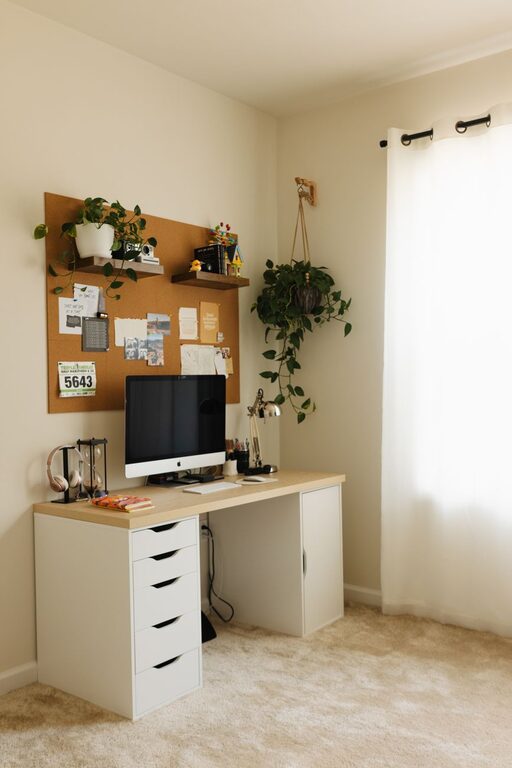
Creating a home office that feels both cozy and productive can make a big difference in how effectively you work and how much you enjoy your time at your desk. Whether you’re working remotely full-time or occasionally taking tasks home, having a dedicated space designed with both comfort and focus in mind can improve your motivation and reduce stress.
In this post, we’ll explore practical tips to help you design a home office that boosts productivity while also feeling warm and welcoming.
Choose the Right Location
The first step to creating a productive workspace is selecting the right spot in your home.
– Quiet and Private: Pick an area with minimal distractions, away from heavy foot traffic or noisy appliances.
– Natural Light: If possible, position your desk near a window. Natural light can improve mood and energy levels.
– Comfortable Temperature: Ensure the space is easy to heat or cool, so you stay comfortable throughout the day.
If space is limited, a corner of a room or a nook with a door can still work well as long as you can set physical boundaries between work and home life.
Invest in Ergonomic Furniture
Comfort plays a key role in productivity. Investing in ergonomic furniture helps prevent discomfort and fatigue.
– Supportive Chair: Choose a chair with good lumbar support and adjustable height.
– Desk Height: Your desk should allow you to keep your forearms parallel to the floor while typing.
– Monitor Position: Your computer screen should be at eye level to avoid neck strain.
Adding a footrest or adjustable keyboard tray can further improve your posture and comfort.
Organize Your Space
A cluttered workspace can hinder your ability to focus. Keeping your desk and surrounding area organized helps clear your mind.
– Storage Solutions: Use shelves, drawer organizers, or filing cabinets to keep documents and supplies tidy.
– Cable Management: Use clips or boxes to control cords and chargers, reducing mess and hazards.
– Desktop Minimalism: Limit the items on your desk to essentials only. This creates a calm environment.
Make it part of your routine to tidy up your workspace at the end of each day.
Personalize Your Workspace
Adding personal touches can make your office feel welcoming without distracting you.
– Plants: Small indoor plants improve air quality and add a touch of nature.
– Artwork or Photos: Choose inspiring or calming images to hang on the wall.
– Decorative Items: Items like a nice lamp, a clock, or motivational quotes can enhance your mood.
Be mindful not to overcrowd your space with too many decorations.
Optimize Lighting
Proper lighting reduces eye strain and keeps energy levels steady.
– Layered Lighting: Use a mix of ambient lighting (overhead lights) and task lighting (desk lamps).
– Avoid Glare: Position screens to reduce reflection from windows or bright lights.
– Warm vs. Cool: Use bulbs with natural or warm tones—they’re easier on the eyes than harsh fluorescent lighting.
If you work late, consider adjustable light settings to mimic natural daylight.
Minimize Distractions
Minimizing distractions helps maintain focus during your work hours.
– Noise Control: Use noise-canceling headphones or white noise machines if your environment is noisy.
– Technology Settings: Turn off non-work notifications and use apps to block distracting websites during work periods.
– Set Boundaries: Communicate your work hours to family or roommates to reduce interruptions.
Creating a routine can also train your brain to focus when you’re in your workspace.
Incorporate Break Spaces
Taking breaks is important to refresh your mind and body.
– Dedicated Relaxation Spot: If possible, have a comfortable chair or corner nearby where you can step away to relax for a few minutes.
– Stretching Area: Leave space for simple stretches or light exercises to avoid stiffness.
– Hydration and Snacks: Keep a water bottle and healthy snacks nearby to maintain energy levels.
Giving yourself permission to take regular breaks can improve overall productivity.
Use Technology to Boost Productivity
There are many tools that can help streamline your work.
– Task Management Apps: Tools like Trello, Asana, or Todoist help keep track of projects.
– Calendar Scheduling: Use a digital calendar to organize your day and set reminders.
– Cloud Storage: Services like Google Drive or Dropbox keep your files accessible and backed up.
Choosing the right digital tools can reduce stress and improve your workflow.
Maintain Work-Life Balance
A cozy home office should support your professional goals without overtaking your personal life.
– Set Clear Work Hours: Define when your workday begins and ends to create boundaries.
– End-of-Day Routine: Develop a habit of shutting down your computer and tidying your desk to signal the end of work.
– Separate Workspace if Possible: A dedicated office area helps your brain associate that space with work only.
Balancing work and relaxation helps keep your home office a positive place.
—
Creating a cozy and productive home office is achievable with thoughtful planning and simple adjustments. Focus on comfort, organization, and minimizing distractions to design a space that supports your work and well-being. With a personalized and inviting environment, you’ll enjoy more focus and satisfaction during your workday.